Payslips, Bank Files & Accounting
What comes out of a finished pay run: payslips for employees, payment files for the bank, and journal entries for your accountant.
Payslips
Payslips become available to employees when a run is Published — they see them in their portal, and notifications go out automatically as part of publishing.
Payroll staff can look earlier. From the moment a run is Approved, its payslips are visible to Payroll Administrators and Payroll Clerks, and to HR Administrators and HR Clerks who hold the Salary permission. Everyone else — including HR staff without that permission — waits for publishing, and nobody sees payslips for a run still in draft. See Roles & Permissions.
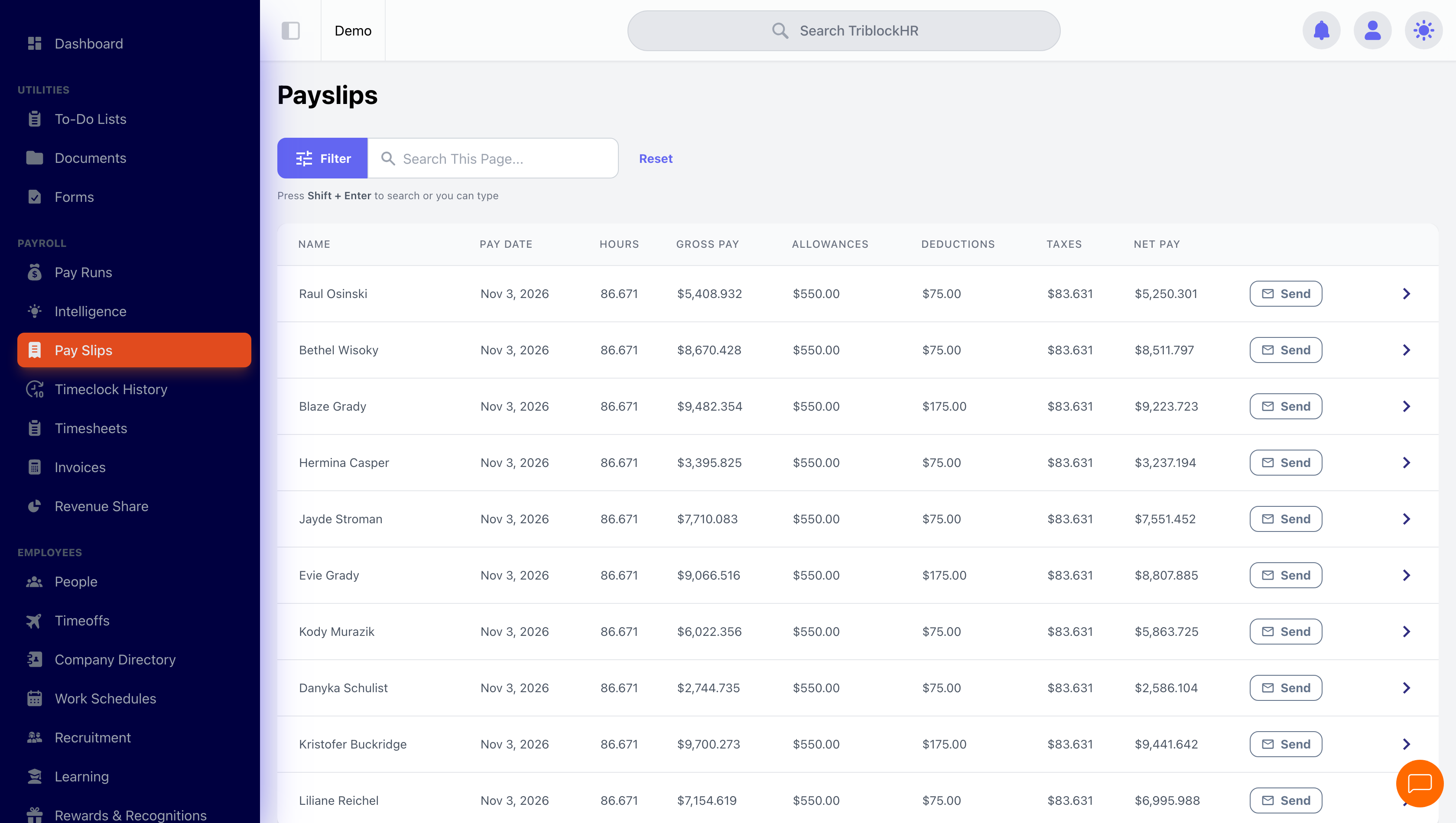
On the Payslips screen you can browse every payslip with pay date, hours, gross pay, allowances, deductions, taxes, and net pay. Click a row to open the PDF. A run's payslips can also be downloaded together as a single zip file, and an individual payslip can be emailed to that employee from its row — useful when one person's copy didn't arrive and you don't want to resend to everyone. You'll see a confirmation that the payslip has been queued for sending.
If a payslip notification couldn't be delivered, the row shows the reason — Skipped (typically zero or negative net pay) or Failed. Use Resend Payslips on the published run to send again.
What's on a payslip
| Section | Contents |
|---|---|
| Earnings | Regular, overtime, holiday, time-off, and other pay — with hours and year-to-date totals |
| Allowances | Each allowance with this-period and year-to-date amounts |
| Deductions | Employee deductions and loan repayments, with year-to-date totals |
| Taxes | Each statutory item for your country, employee and (where applicable) employer portions |
| Bank distribution | How net pay was split across the employee's accounts (account numbers masked) |
| Time-off balances | Remaining balance per leave type, unless hidden by policy |
| Year-to-date summary | Gross, net, and statutory contributions for the year so far |
After you publish: payslips, bank file, accounting export (4–5 min)
Save as: admin-guide__payroll__payslips-exports__vid1.mp4
Bank files
After a run is approved or published, you can export a salary payment file to upload to your bank. The formats available depend on your account's bank integrations — for example Scotiabank's SDI format, or NCB Jamaica's ACH file. The file contains each employee's bank account, branch routing, and the distribution amount for this run.
Accounting export
The accounting export turns the run into journal entries — gross pay, taxes, deductions, and net pay mapped to your chart of accounts. The format and account mapping are configured in your account's accounting settings; if it isn't set up, ask your TriblockHR administrator or support to configure it.
Like bank files, accounting exports are available once a run is approved or published.
Where your configuration uses cost centres, an employee's pay can be split across more than one — so a person who works across two departments lands on both lines in the journal, in the proportions you have configured, rather than being charged wholly to one. Only employees who actually carry an amount on a cost centre line are checked for a valid split, so people outside that arrangement are unaffected.
To make sure nothing is missing from the mapping, Payroll Intelligence flags any pay components that aren't mapped yet — the Accounting Mapping Gaps widget on the Pre-Run Review & Payroll Intelligence dashboard. You can also review the whole mapping at once with the Export to Excel button on the Custom Accounting File Configuration settings page.
Statutory reports
Monthly and annual statutory filings (NIB, PAYE remittances, contribution schedules, employee tax certificates) live in the Reports module, fed by published pay run data. Each jurisdiction has its own report set — see your country's reports in the Reports section. Publish the period's runs before generating filings.