Banking, Allowances, Deductions & Loans
The standing instructions attached to each employee that every pay run reads automatically.
Bank accounts
Each employee can have multiple accounts (Checking, Savings, or Loan) with net pay split between them by Percentage or Fixed Dollar amounts. Accounts are Active or Inactive — only active ones receive pay. If percentage-based accounts don't add to 100%, the screen warns you: "Please verify that all percentage based bank accounts for this account are configured correctly and cumulatively add up to 100%." Heed it — distribution math with a bad split is the classic "my pay went to the wrong account" ticket.
Loan-type accounts are for external repayments (say, a credit union loan): they take a start date and a deduction frequency, and route part of net pay to the lender's account each cycle.
Allowances and deductions
Standing allowances and deductions live on the employee and flow into every qualifying pay run. Both share the same shape:
| Setting | Effect |
|---|---|
| Effective Date / End Date | Active only for pay periods inside this window; leave the end date empty for ongoing. |
| How Often to Deduct | Every pay period, or every 2nd, 3rd, or 4th. |
| Periods of the Month | Restrict it to particular runs within a month — Period 1 through Period 5. Leave it empty and it applies in every period. Which run counts as Period 1 is set per payroll group; see Payroll Groups. |
| Type + Amount | Percentage of pay or fixed dollar amount. |
| Payments Limit | Stops automatically after N applications — for fixed-term items like a 6-payment uniform charge. |
| Assign Default … Values? | Inherit the amount from the company-level type instead of setting it per person. |
Deductions additionally carry an employer amount (for co-funded items like pension or insurance), a Priority controlling the order they're taken when pay can't cover everything, and an optional vendor and reference number. New employees automatically receive your account's standard allowances and deductions from their start date — check the lists rather than rebuilding them.
Loans through payroll
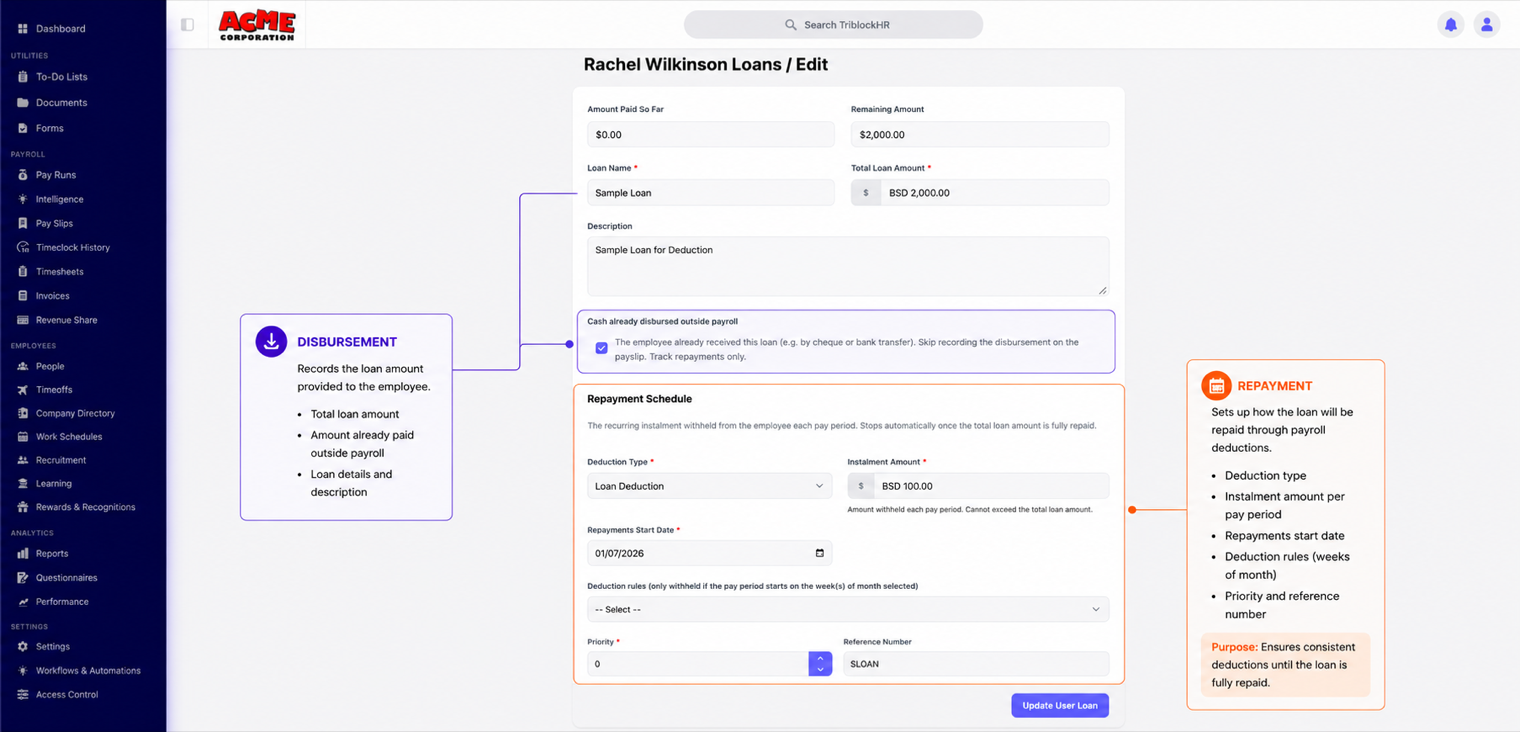
The Loans tab handles staff loans properly instead of through ad-hoc deductions:
- Create the loan with a Loan Name and Total Loan Amount.
- Choose how it was given out. If it's paid through payroll, set the Allowance Type and Disbursement Date — the payout appears once on the employee's payslip. If the cash already went out by cheque or transfer, tick Cash already disbursed outside payroll and skip the payslip line.
- Set the repayment: the Deduction Type, How Often to Repay, and the Repayment Start Date.
From there, the deduction runs automatically and the loan tracks Amount Paid So Far and Remaining Amount from actual payslips. Once payments exist, the loan total locks — corrections go through payroll, not by editing the principal. New loans also surface in the payroll Pre-Run Review, so the approver sees them before the first deduction lands.
Setting up pay distribution and a staff loan (5 min)
Save as: admin-guide__people__compensation__vid1.mp4