Data, Privacy & Audit
Who changed what, who can see sensitive details, and what happens to people's data over time.
Change history & the audit feed
TriblockHR keeps a change log behind most records — personal details, work info, bank accounts, salary, and settings entities all track what changed, when, and who changed it. You'll see this surfaced two ways:
- On the record — many screens show a history of past values (employment history is the clearest example).
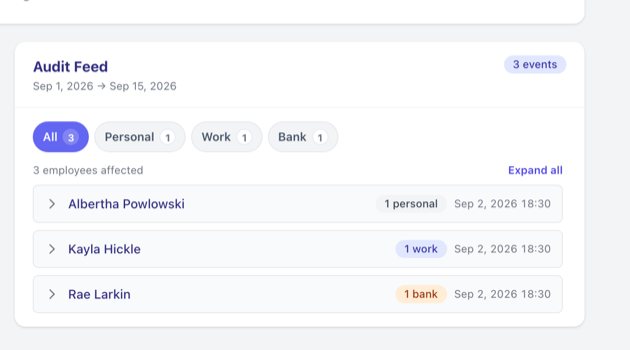
- The audit feed — the Payroll Intelligence dashboard and Pre-Run Review show a chronological feed of recent personal, work, and bank-account changes, each with the before and after value and the admin who made it.
- A pay run's audit trail — each run keeps its own record of what changed inside it: employees added or removed, edited earnings, allowance and deduction changes, imports, and each recalculation. See Pay Runs.
The audit feed is for payroll and HR administrators — seeing salary changes within it also requires the Salary permission. Employees can't view it, and a few sensitive fields (NIB, passport, home address) are hidden from the history shown to non-privileged roles.
Exporting data
Admins can export people and payroll data — the employee list, new hires, terminations, compensation history, bank accounts, time off, and many more — to Excel from Reports. There's no self-service "download all my data" button for individual employees; data export is an administrator action through the report you need.
Protecting sensitive information
| Control | What it does |
|---|---|
| Salary visibility | Only roles with the Salary permission can see pay. For everyone else, salary figures are masked. Being a manager isn't enough — see Roles & Permissions. |
| Payslip encryption | The company setting "Should Triblock encrypt employees' payslips and job letters?" password-protects those PDFs using the last four digits of the employee's NIB number. Set it under Company & Organization. |
| Employee alias | Rename the word "Employee" across the system (to "Staff", "Associate", etc.) to match how your company refers to people. Also in Company settings. |
| Employment-level access | Restrict an HR or payroll admin to specific employment levels, so they only see the people they're meant to. |
What happens to leavers' data
Terminating someone doesn't delete their data. They move out of your active people lists but stay in the system with their full employment history intact — which is what you want for statutory filing, rehires, and historical payroll. There's no automatic purge and no one-click "erase this person" feature; removing specific records is a deliberate manual action.
Reading the change history (2 min)
Save as: admin-guide__access__privacy__vid1.mp4