Running a Review Cycle
Scheduling the review, keeping it moving, and closing it out cleanly.
Scheduling
- Click Create Performance Review. Step one captures the Title, Description, and Start Date / End Date, plus two toggles: Require Sign Off (both employee and manager must approve the finished review) and Include Overall Comment.
- Pick who's reviewed: either Select Employee(s) by name, or use the department/division/level/title filters — one or the other, not both.
- Choose the template, review the summary, and Schedule Review(s). Every reviewee and every stage-one reviewer is notified immediately.
Monitoring the campaign
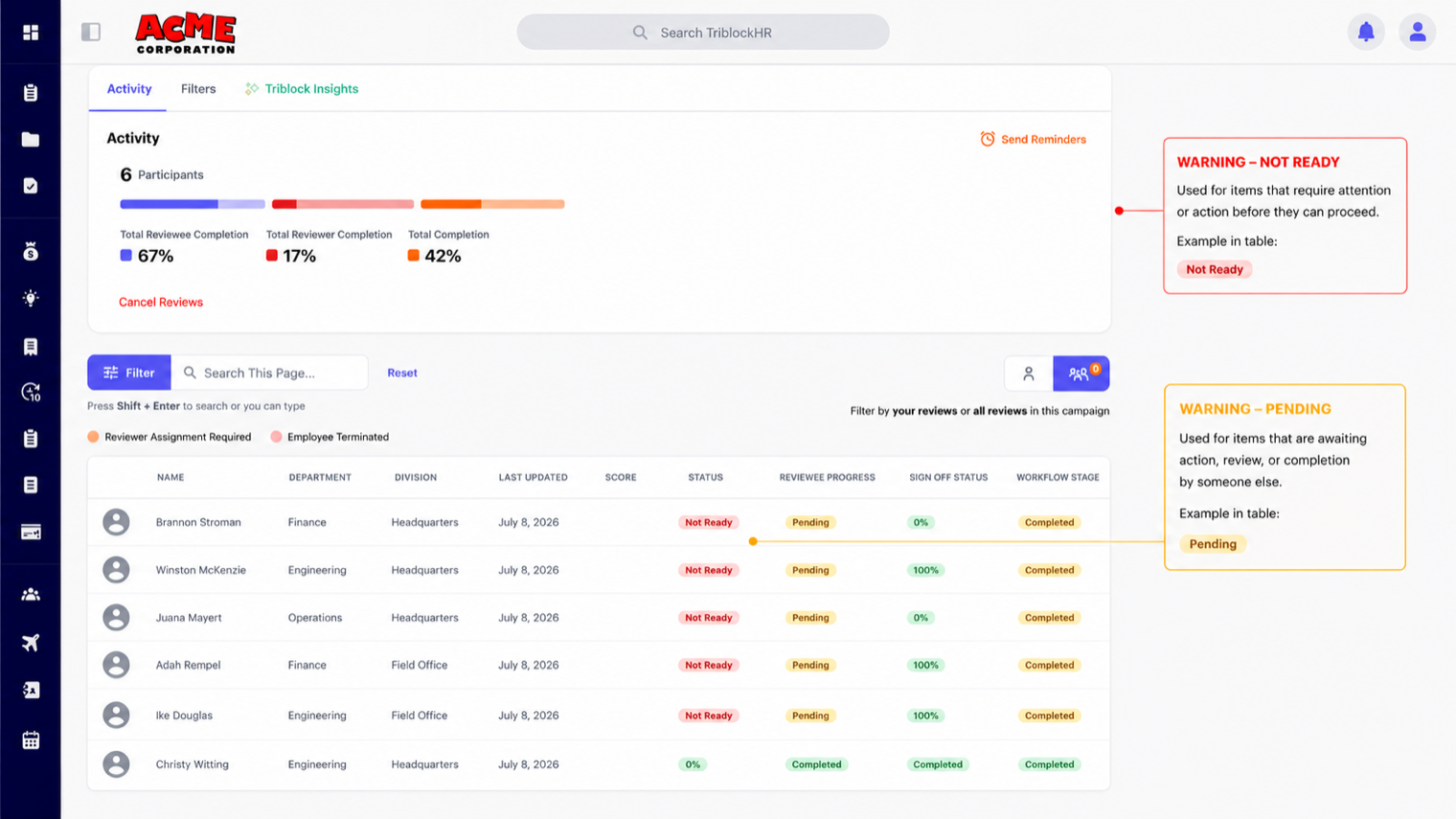
The review's detail page is your mission control: every participant with their score, status, Reviewee Progress, Sign Off Status, and current Workflow Stage. Two row colors demand action — orange means Reviewer Assignment Required (a stage has no valid approver, often after a manager change), red means the employee was terminated mid-cycle. Send Reminders nudges everyone who hasn't finished. Managers track their own people under Direct Reports, which adds per-person metrics: average rating, completion rate, time since last review.
Reassigning a reviewer
When a stage approver leaves or changes roles mid-cycle, an HR admin reassigns the stage from the review — the new approver inherits the stage and its questions, the reviewer track reverts to pending for them, and they're notified. Without reassignment, that review stalls forever; the orange rows exist so it doesn't.
Closing out
A participant's review completes when both tracks are submitted. If sign-off is required, employee and manager each get a Sign Off step on the completed review — that's also where overall comments are added. Scores roll up automatically from the answered, weighted questions; HR admins can adjust section points on the completed review with Edit Points, and every adjustment is marked as edited. The completed review (with a PDF download) becomes part of the employee's record.
A full review cycle in 7 minutes
Save as: admin-guide__performance__running-reviews__vid1.mp4